Tripod Panel
This touchscreen panel has three feet for stability.
Details
| Object | Category | Type | |
|---|---|---|---|
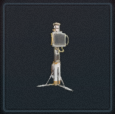 | Tripod Panel | Interactives | Placeable Object |
Inputs
 | Disable Interactable | Disable the Interactable. |
 | Enable Interactable | Enable the Interactable. |
 | Hide | Hide the object. The object will exist if hidden and can be shown again later using Show. |
 | Show | Show the object if it is hidden. The object can be hidden again with Hide. |
 | Delete | Delete the object from the map. An object can't reset, respawn or otherwise reappear for the remainder of the match. |
 | Set Point Of Interest | Apply a POI icon to the object. |
 | Clear Points Of Interest | Remove any POIs that have been set. |
Outputs
 | On Used | When a player presses the use button on an object, send a signal. The player is the activator. |
Properties
| Property | Type | Description |
|---|---|---|
| Name | String | The name of this object. Rename an object to make it easy to identify. |
| Custom Filter | Grid Picker | Limits who or what can use this object. |
| Start Enabled | Boolean | If true, interactable will be enabled on map start. |
| Allow Reuse | Boolean | If true, this object can be used more than once. |
| Panel Title | String | The Panel Title text appears at the top of the touch screen. |
| Button Text | String | The Button Text will appear on the touch screen's button. |
| Button Text When Used | String | After the panel is used, this text will replace the Button Text. |
| Panel Info | String | The Panel Info is a small area for additional text at the bottom of the panel. |